Salon and barbershop websites
What their customers come to the site to do
- See the services and what each costs
- Book a chair from the phone in their hand
- Find the shop, and when it is open

From $1,500CAD per project, plus HST
Last reviewed
What their customers come to the site to do
From $1,500CAD per project, plus HST
Last reviewed
Four things: your booking tool one tap from the first screen, a price list that is current, hours and location that match your Google listing exactly, and photos of your own work. Most of these searches happen on a map, so the profile matters as much as the site. Orient reported 400% more online bookings in the two months after launch and 70% fewer no-shows; their figures, their comparison.
| Typical timeline | Typically two to three weeks for one page; typically four to six weeks for five to ten |
|---|---|
| Typical size | One landing page, built around a single conversion, or a custom site of five to ten pages |
| Booking | Your tool, one tap from any page |
| Client-reported | Orient: 400% more online bookings in the two months after launch |
| No-shows | 70% fewer no-shows, by the shop’s own count |
| What you supply | Prices, photos, hours, policies |
| Price | From $1,500 CAD + HST |
| Plan fit | Essentials, $250 a month, plus profile upkeep |
What is different
The constraints on the right are the pages the site needs because of them.
Pages this site needs
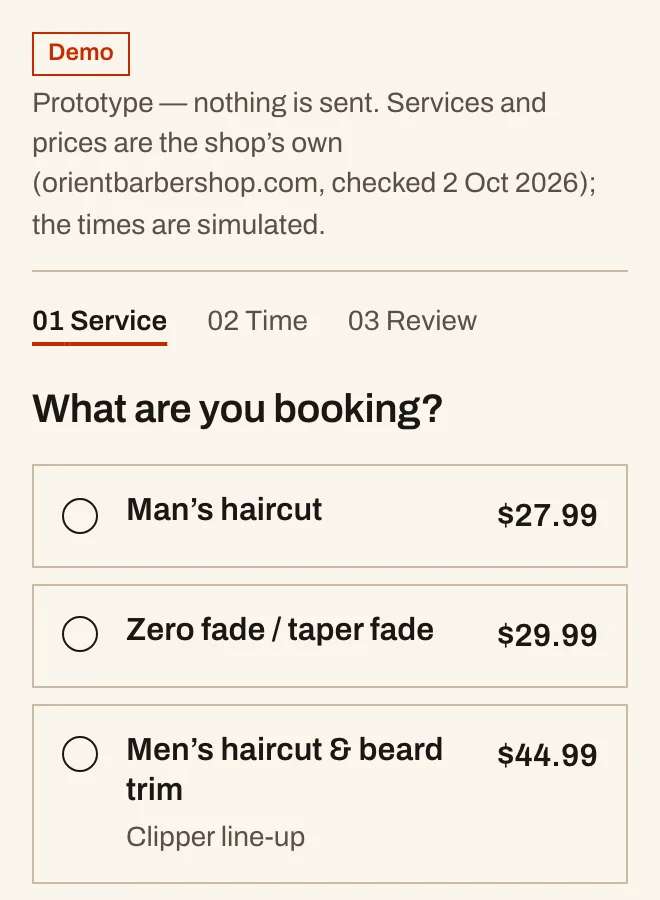
One tap from the first screen, on every page, and on the map listing. Whichever tool you use keeps the appointments and the reminders; the site's job is to get people into it without a second thought. A shop with no online booking loses the customer who will not phone.
Orient Barber Shop reported 70% fewer no-shows after confirmations and reminders went to the phone in the customer's hand, alongside a stated cancellation window. That is a configuration job on your booking tool more than a design job, and it is the highest-value hour of the project.
Categories, services with prices, twenty real photos, correct hours including holidays, the booking link, and reviews with your replies. For a local shop the profile is often the first and only page a customer sees, so we treat it as one.
Real cuts, real colour, real chairs. Stock photography reads as a shop that has nothing to show. And the price list has to match what you charge today, because a stale price is the fastest way to start an appointment badly.
Evidence
The one live project on this site with figures attached: a Kitchener shop we can walk to.
Barber shop · full siteClient-reported

Booking moved above the fold, confirmations and reminders wired to the phone in the visitor's hand, and the Google Business Profile rebuilt to say what the site says.
Their figures, their comparison; we did not audit them.
The booking and no-show figures are the shop's own count, reported to us.
Compliance
Fewer rules than a regulated practice, and two that still matter.
Named deliverables
Checked against the rule, then opened.
Price
How we price it
From $1,500CAD per project, plus HST
A shop site is usually one landing page, built around a single conversion, or a short five-page site, and the smallest build we do. Most of the value is in the booking set-up and the Google profile, so we quote all three together.
Add-ons: extra article $220 · extra page $450 · hourly $120. All figures are CAD and exclude tax.
Month-to-month. Cancel any time. No annual pricing exists.
Changes the price
Not included
Where we work
Waterloo Region gets in-person meetings. Everywhere else runs on a call, a written copy brief and a staging link, which is the same work.
Location pages
Questions
You need somewhere people land when they search your name, see your prices and check your hours. The booking app keeps the appointments. The site and the Google listing are what get someone into the app in the first place.
Confirmations and reminders to the phone, a stated cancellation window, and a deposit on longer services. Orient Barber Shop reported 70% fewer no-shows after that was configured; their figure, their count. It is a setting on your booking tool more than a design decision.
Yes, and on your Google listing. People decide before they call. A missing price list sends them to the shop that published one, and a stale price starts the appointment with an argument.
It is a fine start and a poor finish. The booking page cannot rank for your services or your neighbourhood, it lists other shops beside yours, and it disappears if you change tools. A small site with the booking one tap from every page keeps the customer, the search traffic and the address yours.
Keep reading
Guides
Services
Talk to us
If you would rather talk first, ask us a question. One fixed quote, in writing, after the first conversation.
A written review of what stops enquiries and what to fix first. Yours to keep.
UXPro Design Studio
| hello@uxpro.ca | |
| Hours | Monday to Friday, 9 to 5 Eastern |
| Base | Kitchener, Ontario |
| In person | Kitchener, Waterloo, Cambridge, Guelph |
Every service here ends in something you can inspect. So inspect it.